
Chart of Accounts
The Chart of Accounts is the list of ledger accounts used to organize your business records. Each account tracks a specific kind of balance or activity, such as cash, supplier bills, sales or rent.
Find and read accounts
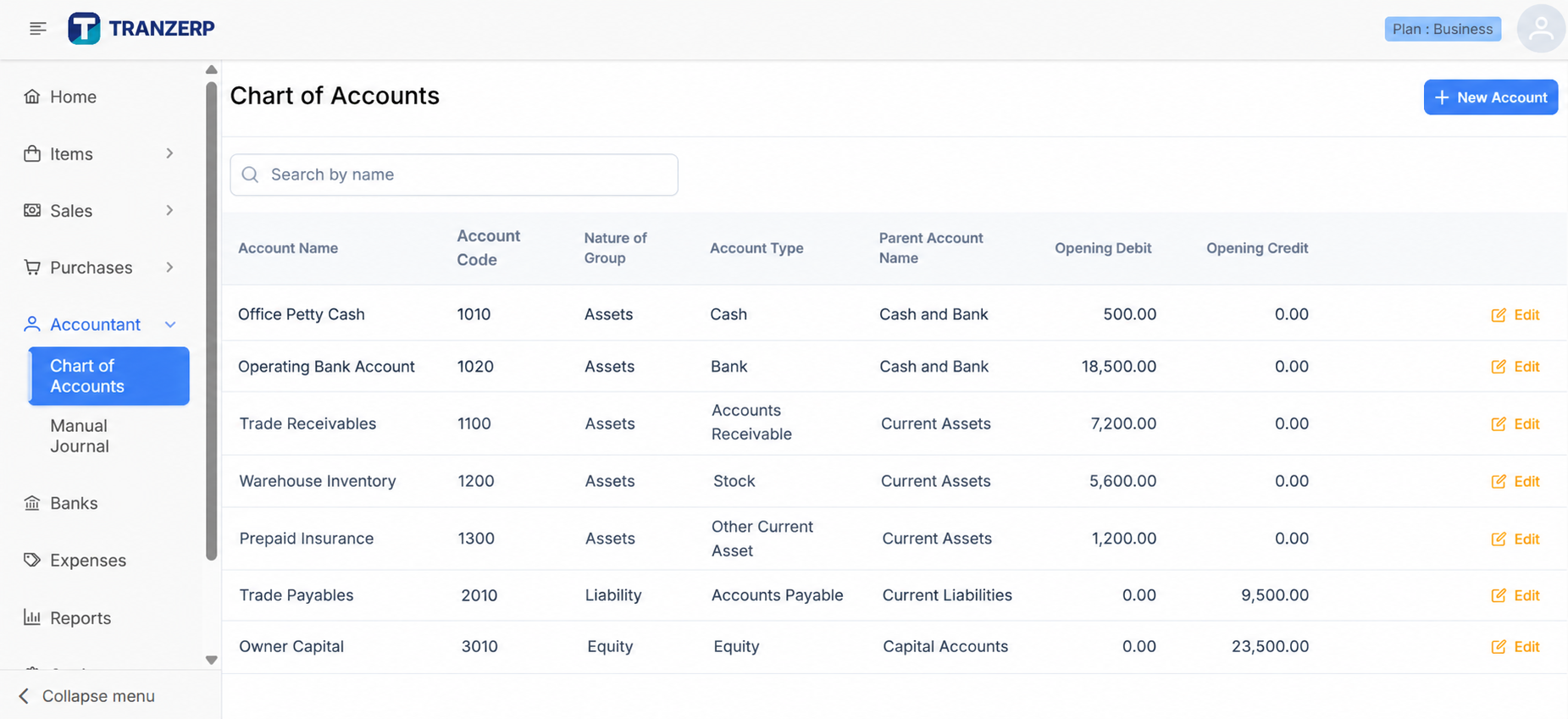
In TranzERP, expand Accountant and select Chart of Accounts. Use Search by name to find an account such as Office Petty Cash or Trade Payables.
- Account Name and Account Code
- The account’s label and its reference code, if one has been assigned.
- Nature of Group and Account Type
- The broad accounting group and the more specific classification. For example, Office Petty Cash belongs to Assets and has the Cash type.
- Parent Account Name
- Shows the account above this one in the chart when a parent is assigned.
- Opening Debit and Opening Credit
- Show which side of the ledger holds the account’s starting balance.
Create an account
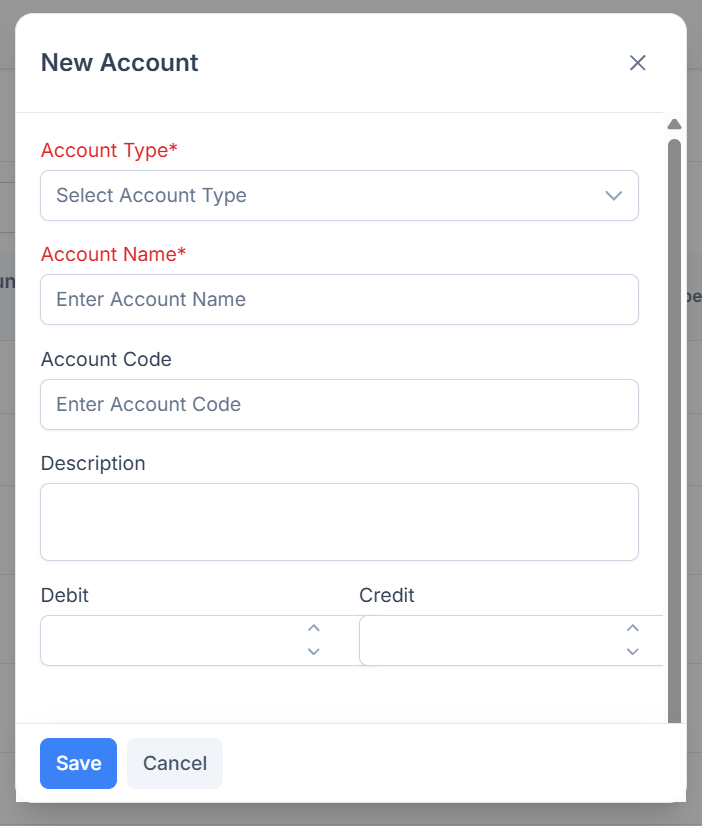
- Search for an existing account with the same purpose before adding one. Click New Account if you need a separate account.
- Select the required Account Type based on what the account will track.
- Enter the required Account Name. Use a name your team will recognize, such as Office Rent.
- Optionally enter an Account Code that follows your organization’s numbering scheme and a Description that explains what belongs in the account.
- If you are carrying over a balance, enter it on the Debit or Credit side shown in your opening trial balance. Review the form and click Save, or click Cancel to close it without saving.
Choose an account type
The dropdown groups account types under Assets, Liability, Equity, Income and Expense. The lists below use the names shown in TranzERP. IFRS accounting terms
Assets
Resources the business controls, such as cash, stock, and amounts customers owe.
- Other Assets
- Other Current Asset
- Cash
- Bank
- Fixed Asset
- Accounts Receivable
- Stock
- Payment Clearing Account
- Intangible Asset
- Non Current Asset
- Deferred Tax Asset
- Capital Work In Progress
- Intangible Assets Under Development
Liability
Obligations the business owes, such as unpaid supplier bills.
- Other Current Liability
- Accounts Payable
- Credit Card
- Non Current Liability
- Other Liabilities
- Deferred Tax Liability
Equity
The owners’ interest in the business after deducting liabilities from assets.
- Equity
Income
Amounts earned by the business, such as sales revenue.
- Income
- Other Income
Expense
Costs recognized by the business, such as rent or the cost of goods sold.
- Expense
- Cost Of Goods Sold
- Other Expense
For example, Accounts Receivable tracks amounts customers owe you, while Accounts Payable tracks amounts you owe suppliers. Expense can be used for operating costs such as office rent. Cost Of Goods Sold tracks the cost of the inventory sold.
Understand opening balances and totals
An opening balance is the amount already in an account when you start tracking it in TranzERP. When carrying balances over from another system, use the opening trial balance agreed for the same date. A debit and a credit are the two sides of the ledger. For example, an existing positive bank balance usually opens on the debit side, and an unpaid supplier balance usually opens on the credit side.
At the bottom of the list, the Total row shows the opening debit and opening credit totals side by side. Across a complete set of opening balances, total debits should equal total credits. Matching totals are a balance check. Also compare individual amounts and account assignments with your source records. Double-entry bookkeeping reference

Edit an account
- Search for the account and click Edit on its row.
- Make the changes and review the account’s purpose, type and opening balance before saving.
- Find the saved account again and check the updated details. If the account is already in use, review changes to its type or balance with your accountant because those fields affect how the books are presented.
Troubleshooting
I cannot find the account.
Clear the search or try part of the account name. Check the type and group when multiple names look similar.
I cannot save the new account.
Check that Account Type and Account Name are filled in and review any message shown by the form.
The opening totals differ.
Compare the full set of balances with your opening trial balance. Look for omitted or duplicated amounts and balances entered on the wrong side.
Several accounts have similar names. Which should I use?
Compare Account Code, Nature of Group, Account Type and Parent Account Name. Review the account’s purpose before selecting or editing it.
Which field holds an opening balance?
Enter the starting amount in Debit or Credit using the side shown in the opening trial balance for the same date. Check the saved account’s Opening Debit and Opening Credit columns.
The totals match. What else should I check?
Compare each account and amount with the opening records. Review account classifications and look for duplicated or omitted balances, even when the overall totals match.